快速开始
下载 SwitchHosts
访问 https://github.com/oldj/SwitchHosts/releases 下载对应系统版本的 SwitchHosts。
比如 macOS 苹果芯片的 下载 SwitchHosts_mac_arm64.dmg, intel 芯片的 SwitchHosts_mac_x64.dmg
windows 64位 SwitchHosts_win_installer_x64.exe, 32位 SwitchHosts_win_ia3.exe
导入 https://host.sonofmagic.top/
通常这需要你的
root权限,假如你是windows系统,请用右键 -> 系统管理员打开SwitchHosts
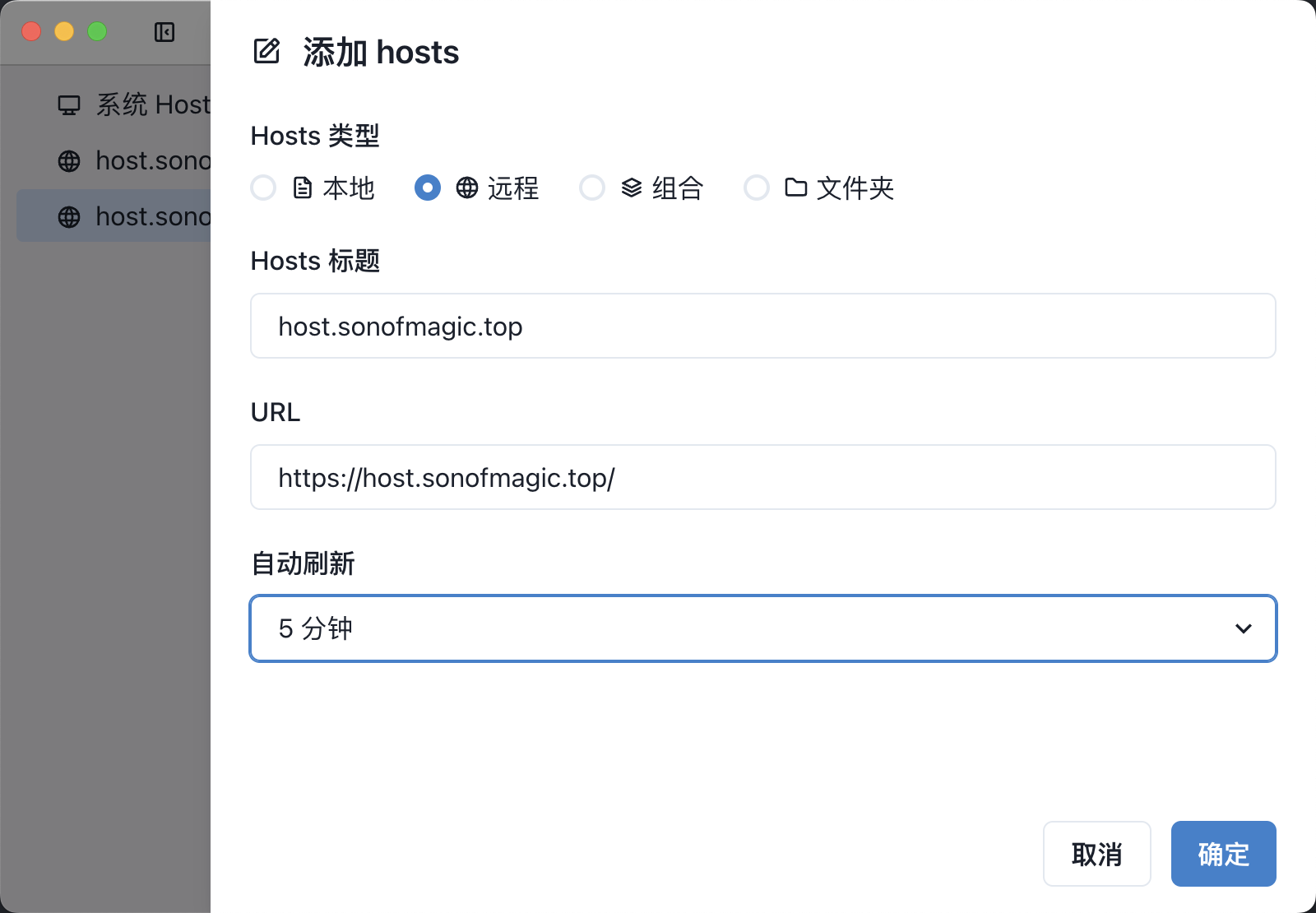
安装好 SwitchHosts 后打开,然后点击左上角的 添加 hosts 按钮,
选择类型为 远程
标题任意,比如 host.sonofmagic.top
URL: https://host.sonofmagic.top/
自动刷新,选择 每 5 分钟, 或者其他任意的时间 (不要选择 从不)
然后点击 确定
这样就搞定了
手动刷新